

MORRCloud
BioLink

The link in your bio, but it sells.

Services, products, memberships and events on one page with checkout on it — and every lead tagged by what they did.

MORR
app.morr.group/biolink
MCFADA
SB

BioLink

PagesLeads
Maya OkaforLive
biolink.you/mayaCopyPublish changes
PhoneDesktop
Open live page
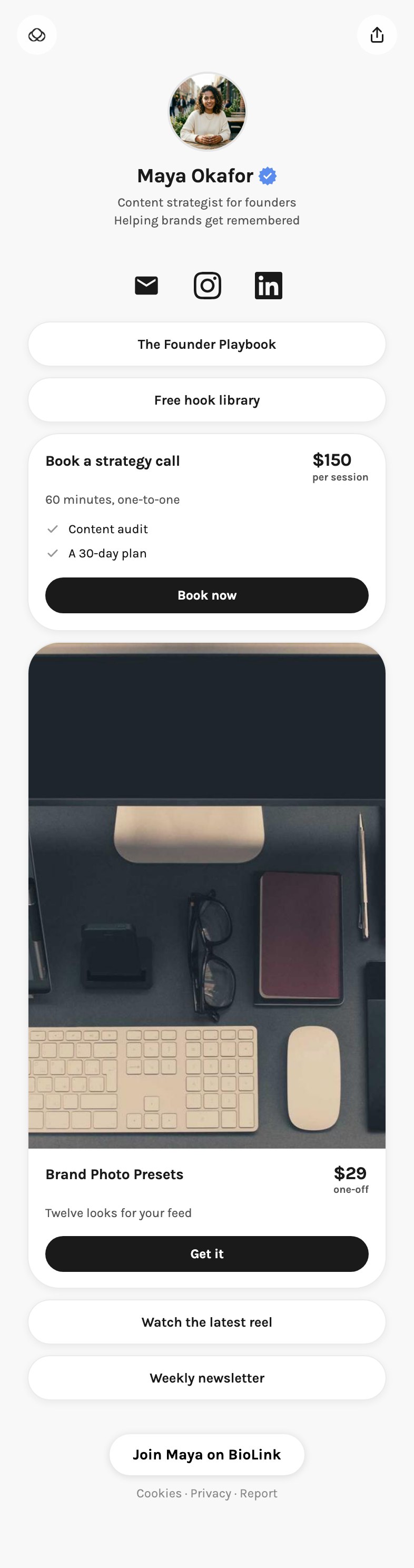
Point at any block on the page to move it, copy it, or get a link to that one block. The plus between two blocks adds a new one there.
ProfileLinks and blocks8DesignInsights

Links and blocks

Everything under your name, top to bottom. Drag a row, or the block on the page, to move it.
Paste a link, or type a name…
Add link
SocialEmail signupContact formProductVideoAll blocks ⌘/
Import from Linktree
  • ⠿Instagraminstagram.com412 taps⋯
  • ⠿LinkedInlinkedin.com96 taps⋯
  • ⠿The Founder Playbookexample.com1,204 taps⋯
  • ⠿Free hook libraryexample.com388 taps⋯
  • ⠿Book a strategy callService · example.com172 taps⋯
  • ⠿Brand Photo PresetsProduct · example.com241 taps⋯
9:41
BioLink mayaLive
Four steps to a live page2 of 4
1
Add your photo and nameThe first thing anybody sees, above every link.
2
Claim your addressThe name after the slash: the link that goes in your bio.
3
Add your first linkTap Add below, pick Link, and paste any address.
4
Go livePuts the page at your address.
Go live
Profile
Change photo
Name
Maya Okafor
Your name, or your brand's
Bio
Content that sells, for founders.
Add Preview
HomeCalendarStudioProjectsBioLinkMore
Sell

Put a price on the page

List what you do with the price on it and let people book it, buy the course, join the membership or register for the event.

Services with a priceProducts and coursesMembershipsEvents
Replaces
Linktree logoLinktreeStan Store logoStan StoreBeacons logoBeacons
9:41
A BioLink page
Proof

Answer it before they ask

Testimonials and an FAQ block, and your newest post pulled onto the page straight from the scheduler.

TestimonialsFAQLatest post
MORR
app.morr.group/biolink
MCFADA
SB

BioLink

PagesLeads
Maya OkaforLive
biolink.you/mayaCopyPublish changes
PhoneDesktop
Open live page
Point at any block on the page to move it, copy it, or get a link to that one block. The plus between two blocks adds a new one there.
ProfileLinks and blocks8DesignInsights

Links and blocks

Everything under your name, top to bottom. Drag a row, or the block on the page, to move it.
Paste a link, or type a name…
Add link
SocialEmail signupContact formProductVideoAll blocks ⌘/
Import from Linktree
  • ⠿Instagraminstagram.com412 taps⋯
  • ⠿LinkedInlinkedin.com96 taps⋯
  • ⠿The Founder Playbookexample.com1,204 taps⋯
  • ⠿Free hook libraryexample.com388 taps⋯
  • ⠿Book a strategy callService · example.com172 taps⋯
  • ⠿Brand Photo PresetsProduct · example.com241 taps⋯
Leads

Everyone who touched it

Every form on the page lands in your leads, tagged by what they did, and the taps show up in your analytics beside the posts that sent them.

LeadsTagged by actionBio page taps
MORR
app.morr.group/analytics
MCFADA
SB

Analytics

7d30d90dShare reportCreate
All channels
3 channels
@maya.creates
Instagram
@maya.okafor
TikTok
Posts published
24
+12%6 on the calendar for the next 14 days
Total followers
18.4K
+3.3%measured today
Page views
52.1K
+17.9%on your BioLink page
Link taps
3,204
+168%taps for every 100 views: 6
Followers
Across every channel, day by day.
+1,184
Bio page
6 taps for every hundred views in the window.
Views 52.1KTaps 3,204

Frequently asked questions

How do payments work?
Through Stripe, including monthly billing for memberships.
Is there a MORR mark on my page?
BioLink Pro is included from Pro upward and takes the mark off your page.
Does it update itself?
Your newest post comes onto the page from the scheduler, so the page is current without you touching it.

Give them somewhere to buy.

Free to start. Paid plans raise the limits.